Brand infrastructure
for the age of AI
On braaand.
braaand — brand infrastructure for the age of AI
Brands can't scale with AI when their guidelines live in a PDF and their assets are scattered. Turn your company's identity into infrastructure. Colors, type, logos, graphics, and voice, wired into every agent, every render, every format.
Get startedThe drift
Braaand ends the AI improv so every output stays on brand.
Your AI made a “creative interpretation”. The almost-right blue. A font that almost looks like yours. Generic images and the wrong logo. Without intervention, every output drifts a little further off brand. It doesn’t have to.
Claude · copy
ChatGPT · post
Codex · ad
Cursor · site
Ensures consistency
Claude Code · email
Gemini · app
Mistral · doc
Agents · banner
How it works
Brand orchestration for the age of AI.
It takes one folder and one sentence. From there on after, every agent and every person on the team builds on brand, automatically.
One folder
Put brand guidelines, fonts, logos and photos in a folder. That’s the prep.
One sentence
Tell any agent with braaand to use the material in the folder to add the brand to braaand.
Everywhere
Now everyone uses the same brand voice, logos, photos, fonts no matter what agent they use.
Tip: With braaand for Teams you can connect your company domain and teammates gain access to the brand automatically when they sign up with a company email. No setup on their end.
Multiformat on brand ads
Made by an agent.
A WWF campaign produced through braaand. Copy written to the brand’s voice rules, the photo framed by its point of interest, the logo pulled from the logo system. One brief, three formats, no manual fixes.
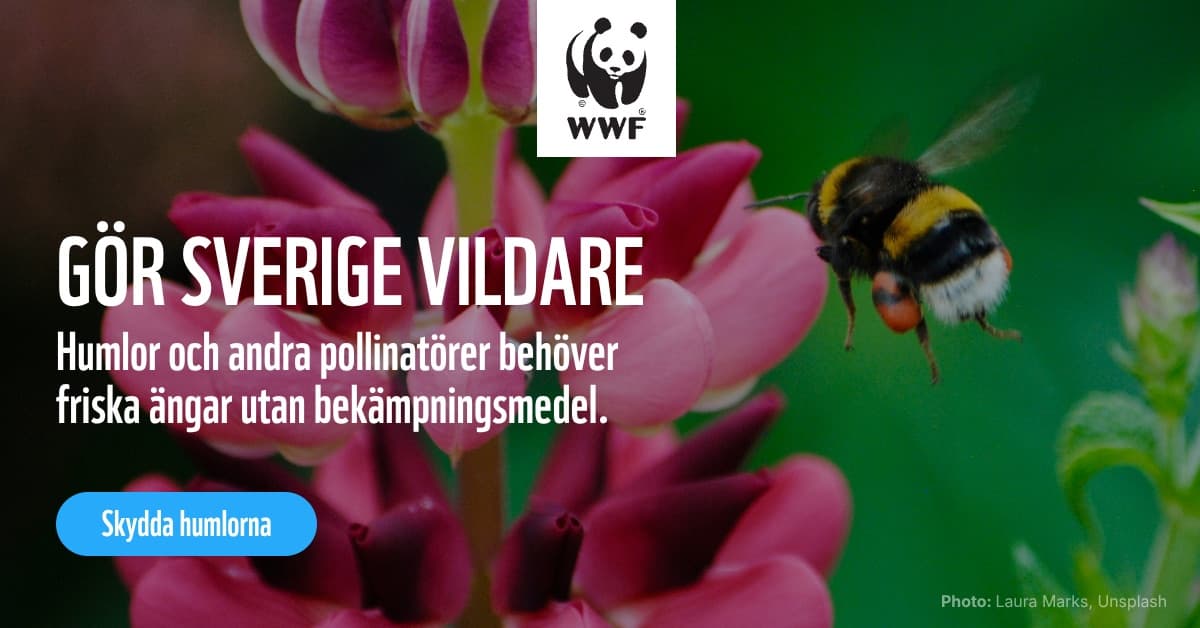


Briefed in a sentence. Rendered in every format.
Your in-app agent
Meet braaand brain.
The orb that lives in the corner of every page is Braaand’s own agent. It’s connected to everything inside braaand, so you just ask. It answers any brand question, brings any asset straight into the chat, drafts ads, builds creatives, navigates the app and co-creates with you inside the braaand editor.
On it. I’ll send you a lightboard link with my proposals to review asap!
Wired to every asset the brand owns: every photo, template, color, CSS example and graphic. It knows every brand instruction and holds detail across hundreds of documents when the job needs it. A brand brain.
Beyond ads
One brand. Every surface.
The brand that makes your ads also builds your website, hands your coding agents a design system, and keeps the people in your AI images looking like themselves.
One page per person, filled from your team records.
Your next
big evening
Sites
Websites, planned and written in your brand
- Describe the company in a sentence and braaand plans the sitemap, then builds every page from a library of more than 150 on-brand sections.
- It writes the copy and places the pictures, your own photos first, while you watch the pages appear on a zoomable canvas.
- Swap a layout, change a surface, or click any line and type. Save an event page as the layout for the next one.
- One page per person, filled from your team's records, and contact details that stay true wherever they appear.
- Publish it with Polyther, or export it as a Next.js project or plain HTML.
--brand-dark--brand-light--brand-accent--brand-muted$ braaand init my-site
✓ Next.js + Tailwind 4
✓ shadcn/ui, in your brand
✓ fonts, logos, sections
$ braaand check
0 off-brand findings
Design system
A design system your coding agents build with
- A complete web style guide, derived from your brand: the heading ladder, text sizes, buttons, forms, spacing and containers.
- Ships as Tailwind 4 and plain CSS, with the same variable names your ads use, so a site and a campaign never drift apart.
- Your brand as a shadcn/ui theme: stock components come out on brand, with no forked component code to maintain.
- One command starts a Next.js project already on brand, and a second checks it for off-brand colors and fonts.
- Tune it on the Design System page, or import it from your current website or CSS.
Characters & image generation
The same people in every picture
- Turn a few photos of a real person into a character, or describe one, and braaand builds a reference pack from every angle.
- Generate images and videos where that person stays recognizably the same while the scene, pose and clothing change.
- Your palette and your rules for imagery ride along when you want them, and stay out when you are just exploring.
- Edit with AI: remove a background, expand a photo past its edges, or animate a still into a short clip.
- Every result lands in your asset library, analyzed and ready for the next ad.
The price
Start free. Stay on braaand.
Free for builders and their agents. Pro for freelancers and small companies. Team gives everyone, and every AI, one shared pool to ship from, plus 2,500 personal credits a month for each member.
Fair pricing, no dark patterns.
Bring your own agent
Free
Always free
Give your coding agents brand superpowers.
- 1 brand
- Braaand CLI
- Braaand MCP
- Braaand Skill
- 50 MB asset storage
Solo freelancers and small companies
Pro
/ user / month
An AI that knows your brand and builds inside it. Not a feature. The whole product.
- Everything in Free
- Braaand Editor (beta)
- Braaand Brain
- Invite collaborators to your brands
- Unlimited templates
- Custom templates
- Color schemes for templates
- 1 GB asset storage
Agencies, teams and companies
Team
/ org / month
Brand infrastructure for the whole team, and the agents working alongside them.
- Everything in Pro
- 2,500 personal credits / month for each member
- External brand portals
- Auto-join by email domain
- Unlimited users
- Org-wide shared brands
- Per-brand allow-domain access for client work
- 25,000 shared AI credits / month
- Admin tooling and usage reporting
- 250 GB asset storage (with per-brand attribution)
For large companies and organisations
Enterprise
Custom pricinglet’s talk
Braaand makes your brand machine-readable, so everything machines make is recognizably yours. As AI agents generate more of your communications, consistency becomes infrastructure.
We offer brand governance for the agentic workforce, built to scale across very large organisations. We migrate you off legacy, build what's missing, and you talk directly to the founders.
Team subscribes from inside an organization. After signing up, create or pick an org and Team becomes available.
Features
A full brand stack, for humans and agents.
Everything your brand needs to live inside an AI workflow: the assets, templates, tools, editor, team, and portals, plus a brain that answers anything you ask.
01/Editor
A baby Figma, wired to the brain
- An editor built into braaand to refine AI proposals, build templates by hand, or change copy, colors, and logos manually.
- The whole editor is wired to braaand's brain, so you can just ask the agent to make changes, flip settings, or suggest ideas.
- Resolves your brand fonts, logos, graphics, photos, and colors by default. Easy enough for colleagues who aren't designers.
- Every template renders in multiple formats automatically, adapting font sizes and photo placement to each one via BrandFit.
$ braaand assets pull --brand wwf
↳ 14 assets resolved · logo, photos, css
$ agent → email pack to studio@acme.com
↳ sent ✓ · posted to #brand
$
02/Agent tools
Plug any agent into your brand
- A CLI, a remote MCP server, and a skill file so any agent can use braaand.
- Your agent retrieves brand knowledge and assets on demand.
- It can delegate to the native braaand agent: emailing assets, posting to a Slack channel, and more.
- braaand builds entire ad campaigns from a brief and sends you a braaand light board link of proposals to review.
03/Templates
Hundreds of layouts, built for agents
- Resolve your brand against hundreds of handcrafted, proven ad and social templates.
- Every layer carries metadata that guides the AI agent. The templates were designed with agents in mind.
- Text layers ship with min, max, and optimal character guidance for agents.
- Compatible with BrandFit, which automatically corrects and optimizes layouts when content changes.
- Supports your brand's color schemes, and full alternative theming when you need it.
04/Assets
A living library every agent can read
- Automatic metadata tagging on every upload.
- Visual point of interest analysis, with POI tags that resolve in the braaand editor on the templates that ship with it.
- Store photos, graphics, CSS, favicons, PDFs, and more in one asset library.
- Ask braaand to email assets to agencies or colleagues.
- Retrieve brand assets straight from Slack.
05/Collaboration
Your whole team, every brand
- Run a single brand or hundreds. Agencies keep every client's brand in one place; larger companies manage their whole portfolio the same way.
- Everyone on your team builds from the same brand, so every output stays consistent no matter who makes it.
- Update a brand once and it changes instantly for every human and every AI agent.
- Assign roles per brand to control who can view or edit each one.
- Give outside agencies and collaborators access to your brands inside their own AI environment.
- Connect a domain so anyone who signs up with your work email gets read access automatically.
06/Brand portals
Share your brand with the world
- Create external brand portals with password or open access.
- Choose from a set of polished portal templates.
- Vibe code custom portals on Enterprise and have them fetch assets and data via our portal schema (beta).
- Track downloads and usage, beautifully.
Found three. Take your pick:
07/Command palette
Everything is a question away
- Press ⌘K anywhere to open the command palette and ask in plain language.
- Ask “How do I upload new photos?” and braaand replies “Drop them to me and I’ll get it sorted.”
- Ask “Any photos of our CEO?” and it takes a look, then hands back a few options to choose from.
- The braaand brain answers questions, makes the change for you, and jumps you straight to the right screen.